




A B2B store grows wholesale sales by letting your trade buyers see their own prices, then order and reorder on their own at any time of day, without waiting for a sales rep.
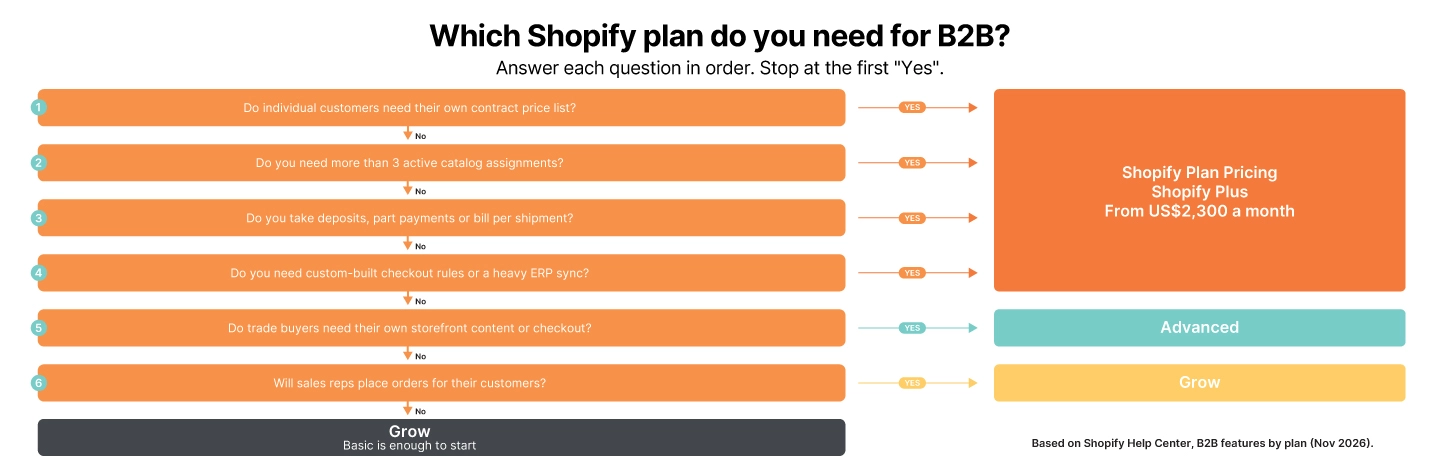
You need Plus when you want to:
- give each trade customer their own price list
- use more than three active B2B catalogues
- ask for deposits or accept partial payments
- add custom-built rules to checkout
- run a busy, high-volume ERP connection
If that sounds like your business, read on. This guide explains what Shopify B2B can do, where Plus earns its fee, and how Singapore businesses can launch a wholesale store without costly rework.
At a glance
| Question | Short answer |
|---|---|
| Do I need Shopify Plus for B2B? | No. Basic, Grow, and Advanced include core B2B features. |
| What does B2B add to my plan cost? | Nothing. B2B features carry no extra charge. |
| What stays Plus-only? | A catalog per customer, unlimited catalogues, deposits, partial payments, pay per shipment and full checkout customisation. |
| What should Singapore sellers check first? | GST treatment, the InvoiceNow requirement, PayNow and bank transfer payments, and PDPA. |
Why are Singapore wholesalers moving online?
Singapore wholesalers are moving online because manual ordering stops working as the customer list grows. Many still take orders through WhatsApp, email, spreadsheets and phone calls. That works when you have 20 accounts. It breaks when you have 200.
If your team says any of these, it is time for a proper B2B store:
- “Sales spends half the day typing orders from WhatsApp messages.”
- “The customer ordered at the old price because the price list was out of date.”
- “We didn’t know the item was out of stock until after we confirmed the order.”
A B2B store lets approved buyers log in, see their own products and prices, reorder in a few clicks, and track every order. Your team spends less time on admin and more time selling.
What do the numbers say?
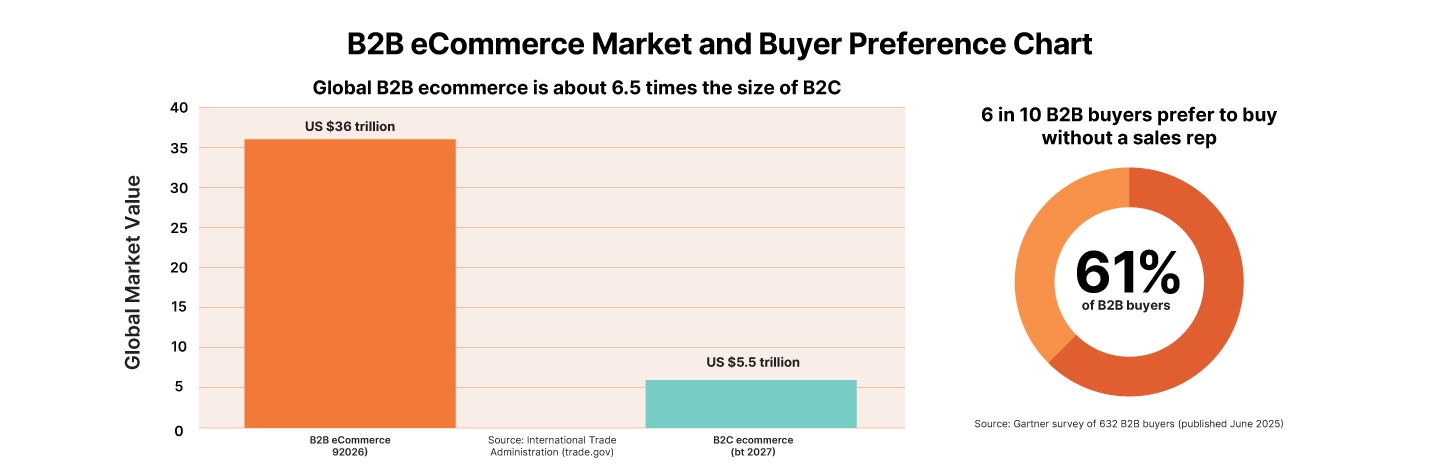
Trade buyers now expect to serve themselves, and the market is far larger than retail eCommerce.
- 61% of B2B buyers prefer a rep-free buying experience, according to a Gartner survey of 632 B2B buyers published in June 2025.
- US$36 trillion: the value of the global B2B ecommerce market by 2026, against about US$5.5 trillion for B2C by 2027 (International Trade Administration).
- Up to 33% more self-serve orders within six months for merchants that adopt Shopify B2B, by Shopify’s own figures (Shopify, April 2026).
What is Shopify B2B?
Shopify B2B is a set of wholesale features built into Shopify. You do not need a separate platform or a bolt-on portal.
The core idea is simple. Instead of treating every buyer as a shopper, you set up each trade customer as a company. A company can have several locations, such as a head office and three outlets. Each location has its own buyers, addresses, payment terms, and prices.
It runs on the Basic, Grow, Advanced, and Plus plans. It is not available on the Starter or Retail plans (B2B features by plan).
Terms you will see in this guide
| Term | Plain-English meaning |
|---|---|
| B2B | Business to business. You sell to other companies, such as retailers, salons or distributors. |
| D2C | Direct to consumer. You sell to the public through your normal online store. |
| Company | A trade customer's account in Shopify. It holds one or more locations. |
| Location | A branch or outlet of a company, with its own buyers, addresses, prices and payment terms. |
| Catalog | A price list. It decides which products a buyer sees and what they pay. |
| Net terms | Pay-later terms. Net 30 means the invoice is due 30 days after the order. |
| Checkout to draft | The buyer submits an order for your team to review before it is confirmed. |
| PO number | The buyer's own purchase order reference, added at checkout. |
| ERP | The back-office system that runs your stock, prices, orders and accounts, such as SAP or NetSuite. |
Do you need Shopify Plus? A side-by-side comparison
Most businesses do not need Plus to start selling B2B, because most B2B features are the same on every plan. The differences are in pricing control, payment options, sales rep access (Grow and above), and trade-specific storefront content and checkout (Advanced and above).
| Feature | Basic | Grow | Advanced | Plus |
|---|---|---|---|---|
| Companies, locations and buyer permissions | Yes | Yes | Yes | Yes |
| Active catalog assignments to B2B markets | Up to 3 | Up to 3 | Up to 3 | Unlimited |
| Catalog assigned to one specific company or location | No | No | No | Yes |
| Minimum, maximum and case-pack rules | Yes | Yes | Yes | Yes |
| Volume price breaks | Yes | Yes | Yes | Yes |
| Net payment terms and payment reminders | Yes | Yes | Yes | Yes |
| Saved credit cards | Yes | Yes | Yes | Yes |
| Deposits, partial payments, pay per shipment | No | No | No | Yes |
| Submit order for review (checkout to draft) | Yes | Yes | Yes | Yes |
| PO numbers, quick order list, easy reorder | Yes | Yes | Yes | Yes |
| Sales rep permissions | No | Yes | Yes | Yes |
| Separate storefront content and checkout for trade buyers (Shopify Markets) | No | No | Yes | Yes |
| Send invoices from draft orders | Yes | Yes | Yes | Yes |
| Shopify Flow automations for B2B | Yes | Yes | Yes | Yes |
Verified against Shopify Help Center, November 2026. Source: B2B features by plan.
Stay on Basic, Grow or Advanced if you have one to three price tiers, simple Net 30 terms and mostly local buyers. Example: a Singapore brand with one wholesale price list for retailers and one for distributors. If field sales reps will place orders for customers, choose Grow or above.
Choose Plus if you have negotiated prices per customer, take deposits on large orders, need custom checkout rules, or sync a high volume of data with your ERP.
Not sure which plan fits? Verz Design is a Shopify Plus agency in Singapore, and our team can recommend the right plan for your setup.
What are the key Shopify B2B features?
The key Shopify B2B features are company accounts, catalogues, order rules, payment terms, order approval, self-service ordering, sales rep access, and account sign-up. Here is each one in plain terms.
Company accounts and buyer permissions
Each buyer at a company gets their own login. You decide whether they can only place orders or can also manage the location and see all its orders. This suits procurement teams, branch buyers, and franchise networks where several people share one account.
Catalogues: the right products at the right price
A catalog decides which products a buyer sees and what they pay. You can include your full range or only selected items. Set one percentage change for the whole catalog, then add fixed prices for any product that needs its own price. Fixed prices always win (B2B catalogues). Use catalogues to run separate price lists for retailers, distributors, and key accounts.
Order rules and volume pricing
Wholesale runs on cartons and minimums. Shopify lets you set minimum, maximum, and step quantities, plus lower prices for bigger orders (quantity pricing).
Example: buyers must order in cartons of 12; the minimum is 24 units, and the unit price drops at 48 units.
Payment terms and invoices
Set payment terms for each company location. The options are net 7, net 15, net 30, net 45, net 60, net 90, or due when the order is fulfilled (payment terms). Buyers pay later from their account, and Shopify Flow can send automatic payment reminders.
Other payment options include saved cards (with Shopify Payments), PayPal and manual methods such as bank transfer or cash on delivery (B2B features overview).
Quotes and order approval
Need to check an order before you accept it? Turn on “checkout to draft” for a company location. The buyer’s order arrives as a draft for your team to review. The quoted prices are locked by default, so later price changes do not affect it. Your team can also reserve the stock until a set date so nobody else can buy it (B2B draft orders, reserving stock).
Self-service ordering
Buyers log in to see their products and prices. They can:
- view their order history and account details
- add their purchase order (PO) number at checkout
- use a quick order list to add many products and sizes from one page
Buyers with location admin access can also reorder a past order in one click and send return requests themselves (B2B features overview). For buyers placing the same 40-line order every fortnight, this is the feature that wins them over.
Sales rep access (Grow plan and above)
Give field sales reps access only to their own customers. They can place orders on a customer’s behalf without seeing other customers’ orders and company records (sales staff).
Account sign-up and automation
Using the free Shopify Forms app, add a trade account request form to your store. Applicants are saved as companies, ready for you to approve. They can’t see B2B prices or place B2B orders until you approve them. Shopify Flow can then assign payment terms, send invoices, and tag accounts for you (company account requests).
What does Shopify Plus add for B2B?
Shopify Plus adds four things for B2B: a price list for every customer, deposits and part payments, custom checkout rules, and room for heavy integrations. Shopify lists Plus from US$2,300 a month (Shopify Plus pricing). Here is what that buys a wholesale business. For the wider picture, see the benefits of Shopify Plus.
- A price list for every customer. Only Plus lets you assign a catalogue directly to one company or one location (plan features). If your 50 largest accounts each have their own contract prices, this is the deciding feature.
- Deposits and part payments. Ask for a deposit before you start a large order, accept payment in parts, or bill each shipment separately. Useful for furniture, fit-out, custom production and staged deliveries.
- Custom checkout rules. Plus gets full checkout customisation and custom checkout logic. Some ready-made apps can hide payment options on any plan, but custom-built rules, such as sending only orders above a set value for review, need Plus (Shopify changelog).
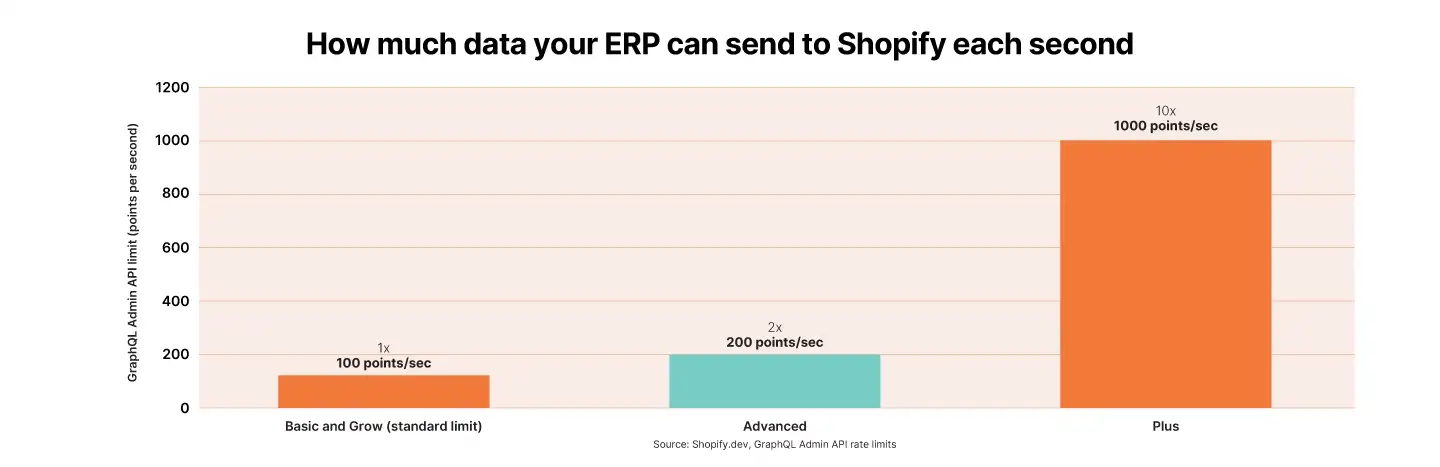
- Room for heavy integrations. Plus lets your ERP send about 10 times more data to Shopify each second than standard plans, and 5 times more than Advanced (rate limits). That matters when your ERP syncs prices, stock and orders all day.
How much does Shopify B2B cost in Singapore?
Shopify B2B costs nothing beyond your Shopify plan. The B2B features are included in Basic, Grow, Advanced, and Plus, so your real costs come from four places:
| Cost | What it covers | What drives it |
|---|---|---|
| Shopify plan | Monthly subscription. Plus is listed from US$2,300 a month. | Whether you need the Plus-only features above. |
| Store design and build | Trade storefront, quick order list, account pages, buyer onboarding. | How different the trade experience is from your retail store. |
| ERP or accounting integration | Syncing companies, prices, stock, orders, and invoices. | Your ERP, the number of data flows, and whether a ready-made connector exists. |
| Apps and payment fees | Any extra apps, plus card or gateway fees on paid orders. | Your payment mix. Bank transfer and PayNow on net terms keep card fees low. |
For current plan prices in Singapore dollars, see our Shopify pricing guide for Singapore.
What can Shopify B2B not do? (Check these early)
Shopify B2B has seven limits that catch teams out. Knowing them before you start saves weeks later. All are listed on Shopify’s B2B requirements page.
- New customer accounts only. B2B buyers must use Shopify’s new customer accounts, not the legacy version.
- No express wallets. Shop Pay, Apple Pay, Google Pay and Amazon Pay do not work for B2B orders.
- Some features don’t apply to B2B. Local delivery and pickup points at online checkout, tipping, subscriptions, and agentic storefronts (selling through AI shopping agents) are not available to B2B buyers. Local delivery still works on B2B draft orders your team creates in the admin.
- Some features start to be switched off. Pickup in store, abandoned checkout emails, and gift cards at checkout are off for B2B. The store owner can ask Shopify Support to turn them on.
- 500 lines per order. An order or draft order can hold up to 500 different products or variants.
- Every B2B order needs a company. If an order isn’t linked to a company location, it is treated as a retail (D2C) order, so Shopify’s B2B fee rates don’t apply.
- Not every app supports B2B. Before you install a reviews, loyalty or search app, ask the developer if it works with B2B buyers and their prices.
Your Singapore checklist
Singapore B2B sellers need to settle four local points before launch: GST, InvoiceNow, payments and PDPA. Global guides skip these.
- GST: GST-registered businesses charge 9% on most local sales (IRAS). Shopify lets you mark a company location as tax-exempt where that applies. Agree with your accountant how trade prices and tax invoices should show GST before you build your price lists.
- InvoiceNow: IRAS is phasing in the GST InvoiceNow requirement, which sends invoice data to IRAS through the Peppol network. It applies to newly incorporated companies that register for GST voluntarily from 1 November 2025, and to all new voluntary GST registrants from 1 April 2026. Dates for other GST-registered businesses will follow (GoBusiness). Check whether it applies to you, and make sure the system that issues your tax invoices, usually your ERP or accounting software and not Shopify, can send through InvoiceNow.
- Payments: Saved cards need Shopify Payments. Many trade buyers prefer PayNow or bank transfer, which net terms and manual payment methods handle well. If you add a local gateway, test it with B2B checkout and invoice payment before launch. Our guide to payment gateways in Singapore compares the main options.
- PDPA: B2B accounts hold names, phone numbers and addresses. Any app that reads customer details must be approved by Shopify, and your own processes must follow PDPA.
How do you connect your ERP to Shopify B2B?
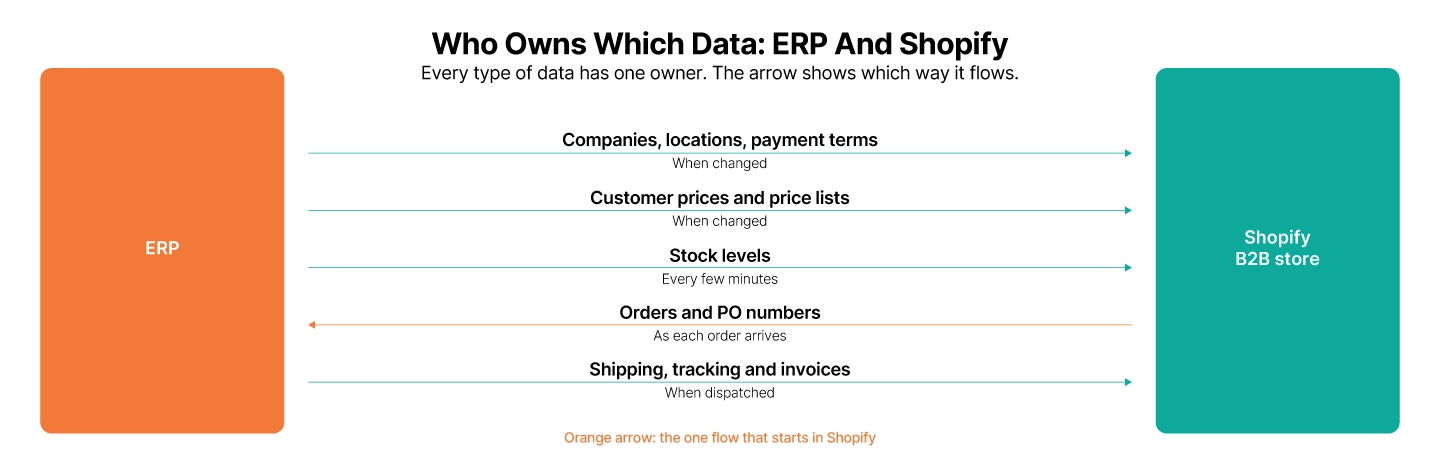
Connect your ERP by giving every type of data one owner, then syncing in one direction. Most wholesalers already run an ERP. In Singapore, that is often a global system such as SAP S/4HANA, SAP Business One, Oracle NetSuite, Microsoft Dynamics 365 Business Central, Acumatica or Odoo, or one from a Singapore-based vendor such as Synergix or Konverge Evolut. Your B2B store must work with it, not against it.
The golden rule: every type of data has one owner. Decide this before anything is built.
| Data | Owned by | Flows | How often |
|---|---|---|---|
| Companies, locations, payment terms | ERP | ERP to Shopify | When changed |
| Customer prices and price lists | ERP | ERP to Shopify | When changed |
| Stock levels | ERP or warehouse system | ERP to Shopify | Every few minutes |
| Orders and PO numbers | Shopify | Shopify to ERP | As each order arrives |
| Shipping, tracking and invoices | ERP | ERP to Shopify | When dispatched |
Two tips that keep integrations healthy for years:
- Work out the final price in the ERP. If a customer’s price depends on contract, tier, and promotion, let the ERP calculate it and send one final price to Shopify. Don’t rebuild your pricing rules twice.
- Don’t call the ERP during checkout. In most cases, Shopify’s checkout can’t check your ERP live. Sync stock and credit limits to Shopify ahead of time instead.
You can connect through a ready-made connector (Shopify works with partners such as Microsoft Dynamics 365, Acumatica and Celigo), an integration platform, or a custom-built app (Shopify B2B for enterprise). For ERPs with business-specific data, a custom app is often simpler to run than several stacked apps, which is where custom web development comes in. Whatever you choose, agree on who looks after Shopify’s API updates, which come out every quarter.
How you connect depends on your ERP. SAP S/4HANA projects usually run through SAP’s integration layer (SAP Integration Suite) or a middleware partner. SAP Business One, NetSuite, Dynamics 365, and Acumatica have ready-made connectors or integration platform options. ERPs from Singapore-based vendors such as Synergix and Konverge Evolut may not have an off-the-shelf Shopify connector, so check early whether your ERP version offers an API that a custom app can use. If you are comparing partners, our list of Shopify agencies for complex integrations is a useful starting point.
One store for B2B and retail, or two?
Start with one store for most businesses. Shopify lets you run B2B and retail from one admin, and even one store (Shopify B2B for enterprise). One store means one set of products, one stock pool, and one site to maintain.
A separate wholesale store makes sense when:
- trade and retail sell under different brands or different companies
- the trade range is very different from retail, such as bulk packs or trade-only items
- you need gift cards, abandoned checkout emails, or pickup in store to work differently for trade and retail, because in a shared store those settings apply to both
On Plus, a second store adds no license fee, as Plus includes up to 9 extra stores (Shopify Plus pricing). The real cost is time: two stores to update, two sets of apps and two ERP connections.
Your step-by-step launch plan
A Shopify B2B launch runs in seven steps: discovery, data setup, integration, storefront, pilot, rollout, and improvement. In our experience, B2B projects rarely go wrong because of Shopify features. They go wrong because pricing rules, credit terms, and data ownership weren’t agreed on early. This plan fixes that.
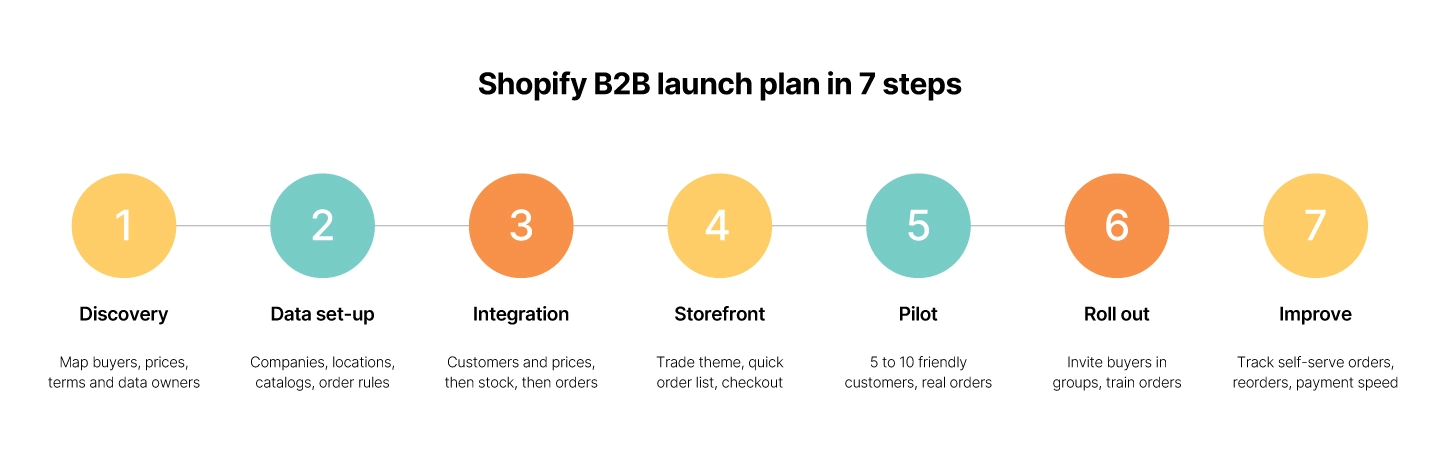
Step 1: Discovery. Write down how you sell today. Answer these questions first:
- What types of trade buyers do you have? (for example, local retailers, regional distributors, corporate buyers, franchisees, key accounts)
- Which customers get their own prices or product range?
- What are your minimum orders and carton sizes?
- Who gets payment terms, and who approves orders and credit?
- Which system owns products, customers, stock, and prices?
- How will GST, tax-exempt customers, and overseas orders work?
Your answers decide whether Advanced is enough or you need Plus. For ERP projects, price this step separately so the build quote is based on facts.
Step 2: Data setup. Map companies, locations, catalogues, and order rules. Decide on one store or two.
Step 3: Integration. Connect your ERP in this order: customers and prices first, then stock, then orders.
Step 4: Storefront and checkout. Design the trade experience and set up the quick order list. You can start from Shopify’s Trade theme, built for wholesale, or commission a custom eCommerce website design. On Plus, add any checkout rules.
Step 5: Pilot. Invite 5 to 10 friendly customers. Test real orders, payment terms, part shipments, and invoices from start to finish.
Step 6: Roll out. Invite the rest of your customers in groups. Train your sales and service teams, and switch on automatic reminders.
Step 7: Improve. Track how many orders come in without a sales rep, how often buyers reorder, and how quickly invoices get paid.
Three common mistakes to avoid
- Treating B2B like a hidden retail store: Trade buyers need their own prices, bulk ordering, and clear payment terms, not just a password page.
- Copying every spreadsheet rule into Shopify: Simplify your price lists first. Then automate the rules that are stable.
- Launching without onboarding buyers: Give buyers a simple login guide and reorder walkthrough, and have sales reps on hand for the first 30 to 60 days.
Planning a B2B store in Singapore?
B2B is now a standard part of Shopify. So the real question is no longer “Can Shopify do wholesale?” It is “How complex is my pricing and payment model?”
- A few price tiers and simple payment terms: start on Grow or Advanced.
- Contract prices per customer, deposits, checkout rules or a busy ERP connection: go with Plus.
Whichever plan you choose, start with a short discovery. Map your buyers, prices, payment terms, and ERP data first. Everything else gets easier after that. You can see how this plays out on live stores in our Shopify Plus projects.
Verz Design plans and builds Shopify and Shopify Plus B2B stores for Singapore and APAC businesses, from discovery to ERP integration and launch. Get an honest recommendation on the right plan and setup for your business. Talk to our Shopify team now!

Get more value from your existing website traffic
Contact Verz Design about a CRO strategy tailored to your business goals.
Get a free CRO consultation
Frequently Asked Questions
No. Since 2 April 2026, Shopify B2B works on the Basic, Grow, Advanced, and Plus plans. You need Plus for a price list per customer, more than three active catalogue assignments, deposits and partial payments, and full checkout customisation.
Shopify does not charge extra for B2B features. You pay for your Shopify plan, and Plus is listed from US$2,300 a month. Budget separately for store design, ERP integration, and any apps you add.
Shopify B2B is a set of wholesale features, and Shopify Plus is a plan. B2B features are included in the Basic, Grow, Advanced and Plus plans. Plus adds the advanced B2B options: direct company catalogues, unlimited catalogues, deposits, partial payments and full checkout customisation.
Yes, with limits on the lower plans. On Plus, you can assign a catalogue to one company or one location, so each account sees its own contract prices. On Basic, Grow, and Advanced, prices are set through B2B markets with up to three active catalogue assignments, which suits a few price tiers or key accounts.
Yes. Shopify lets you sell to trade and retail customers from one store and one admin, with shared products and stock. Choose a separate wholesale store only if trade and retail use different brands, very different ranges, or need different checkout settings.
Yes, on every plan that supports B2B. You can offer net 7, 15, 30, 45, 60 or 90 days, or payment when the order is fulfilled.
Yes. Many Singapore trade buyers pay invoices by PayNow or bank transfer, which works with net payment terms and manual payment methods. If you add a local gateway, test it with B2B checkout and invoice payments before launch.
No. Shop Pay, Apple Pay, Google Pay, and Amazon Pay do not work for B2B orders.
Yes, on every plan that supports B2B. You can set minimum, maximum, and step quantities for each product in a catalogue, and add lower prices for larger quantities.
Yes. With checkout to draft, orders come to your team for review first, and the quoted prices are locked by default.
Share this article:


